


70# Algo Power AI -TradingView
Janus Trader 2026
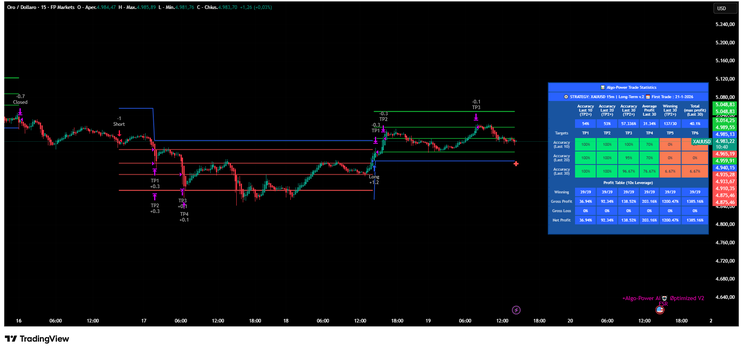
Algo Power is an advanced TradingView strategy built to identify trend movements, breakout zones, and structured entries using a combination of:
-
Supertrend logic
RSI filtering
ATR volatility filtering
Fibonacci dynamic levels
Multi Take Profit system
Optional DCA (Dollar Cost Averaging) entries
Trailing Stop and Break-even logic
This strategy is designed for crypto, forex, indices, commodities, and stocks.
2. PLATFORM REQUIREMENTS
To use Algo Power, you need:
-
A TradingView account
Access to Pine Script v5
A chart with your preferred asset and timeframe

3. HOW TO INSTALL
-
Open TradingView
-
Go to the Chart section
-
Click on “Pine Editor”
-
Paste the Algo Power script
-
Click “Add to Chart”
-
Open the Settings panel (⚙️ icon)
4. QUICK START SETUP (RECOMMENDED)
Step 1 – Choose a Strategy Preset
Inside settings, locate:
Strategies (Asset Selection)
Select the preset that matches:
-
Your trading pair
Your timeframe
Example:
-
BTC/USDT – 15m | Short-Term
EUR/USD – 15m | Short-Term
XAU/USD – 30m | Mid-Term
These presets automatically optimize:
-
Sensitivity
RSI limits
Volatility filtering
Step 2 – Choose Trade Direction
Under Strategy Options:
-
Enable Long Side (for buy trades)
Enable Short Side (for sell trades)
You may enable both for full automation.
Step 3 – Configure Take Profit & Stop Loss
Under 💰 OUTPUT SETTINGS 💰:
You can choose:
Multi Profit Mode (Recommended)
-
TP1
TP2
TP3
TP4
Each TP has:
-
Percentage target
Exit percentage of position
Example:
TP1 = 0.5% (Exit 30%)
TP2 = 1.1% (Exit 30%)
This allows scaling out safely.

Step 4 – Stop Loss Settings
You can choose:
-
Fixed Percentage SL
ATR-based Stop Loss
FIB Level Stop
Trailing Stop
Move Stop to Breakeven after TP1
Recommended setup:
-
Stop Loss = 1.5%
Move SL to Entry after TP1 = ON
Trailing Stop = ON

This allows scaling out safely.
Step 4 – Stop Loss Settings
You can choose:
-
Fixed Percentage SL
ATR-based Stop Loss
FIB Level Stop
Trailing Stop
Move Stop to Breakeven after TP1
Recommended setup:
-
Stop Loss = 1.5%
Move SL to Entry after TP1 = ON
Trailing Stop = ON
5. HOW THE STRATEGY WORKS
Entry Logic
A trade is triggered when:
-
Trendline direction changes
-
Price breaks Fibonacci trend zone
-
RSI & ATR filters confirm market conditions
-
Sideways filter conditions are satisfied
Green signals → Long
Red signals → Short
DCA (Dollar Cost Averaging)
If enabled:
You can select:
-
2 entries
3 entries
5 entries
The strategy creates structured entry zones between:
-
Current price
Trendline
Fibonacci level
This allows:
-
Better average entry
Reduced risk per entry
Sideways Market Filtering
You can filter trades using:
-
ATR filter
RSI filter
ATR OR RSI
ATR AND RSI
Flat market only mode
If you want fewer trades → use “ATR and RSI”
If you want more signals → use “No Filtering
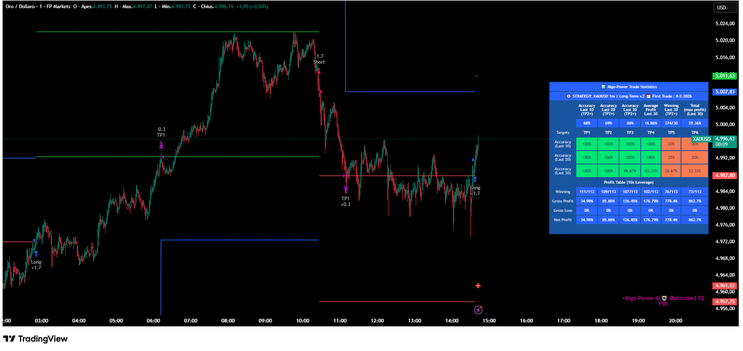
6. DASHBOARD & VISUAL ELEMENTS
You can enable:
-
Dashboard statistics
Trade Idea visualization
Trailing configuration
Entry/TP/SL labels
Labels display:
-
Entry zones
TP levels
SL levels
Percentage movement
If interested, write an email to: [email protected]
or buy it here Etsy.
70# 5 min scalping with 5MSM VISHNU Indicator -TradingView-
Trend Following Strategy
Donchian Buy and Sell filter
Submit by Janus Trader
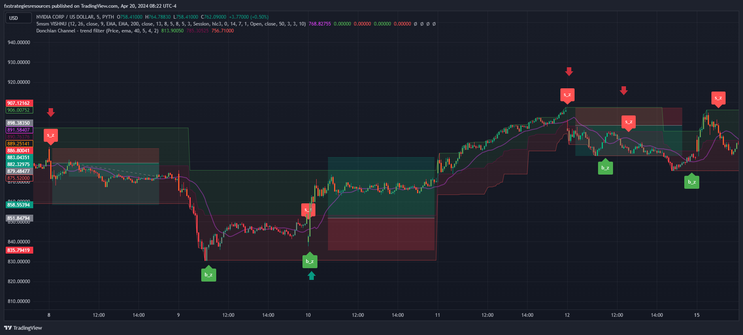
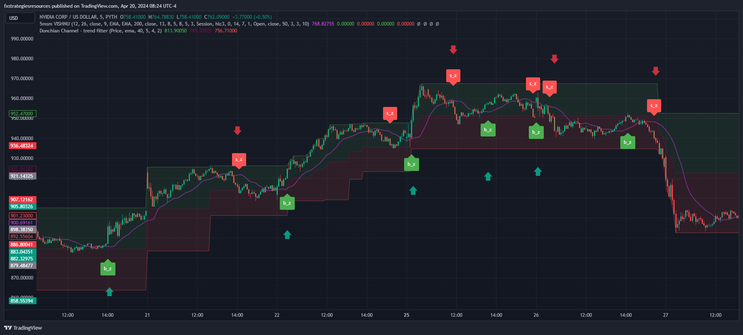
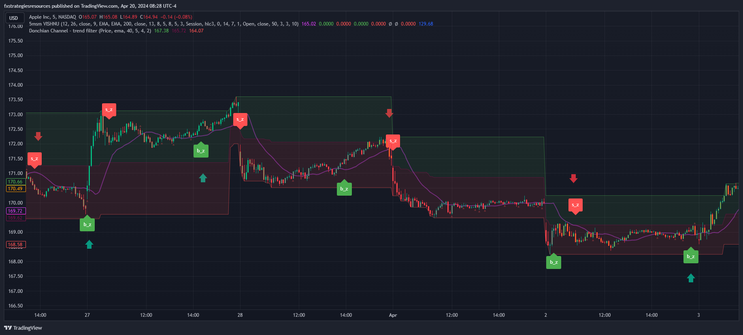
5 min scalping with 5MSM Vishnu indicator is a scalping strategy based on 5MSM VISHNU Indicator for Trending Markets originally written by Patrick1994.
It was originally based on the MACD 12-26 and the 50 bar EMA. In the strategy there is a Momentum indicator as a Donchian Channel filter by (Ualgo). This strategy was designed primarily for stocks. the indices the oil.
Setup Strategy
Time Frame 5 minutes
Currency Pairs volatile with low spreads, Nasdaq 100, Gold, Stocks, BTCUSD.
Indicators
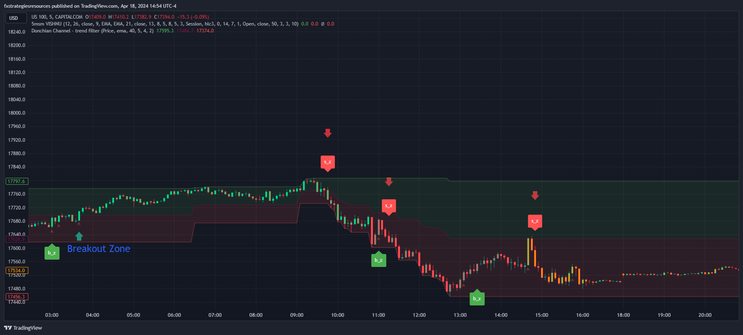
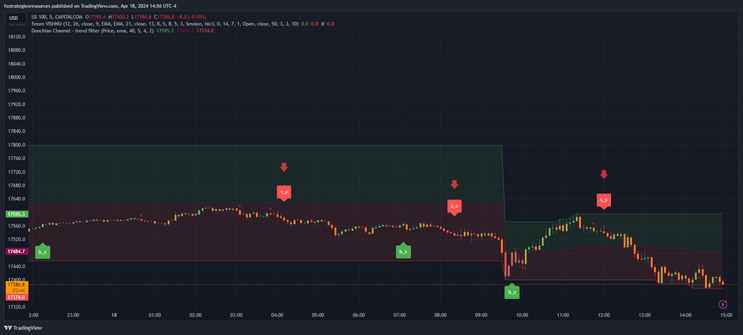
5MSM Vishnu indicator default setting (in style remove trailin stop lines) changes Ema from 200 to 21.
Donchian Channel filter 40 periods.
Trading Rules
Buy
5MSM Vishnu buy arrow
Donchian Channel green zone.
Breakout zone green with buy arrow in red zone (optional).
Sell
5MSM Vishnu sell arrow
Donchian Channel red zone.
Breakout zone red with sell arrow in green zone (optional).
Exit position
Place initial stop loss on the previous swing high/low.
Profit target ratio stop loss from 1:! to 1:1,2.
Money Management fix 1.5%.
In conclusion, a simple strategy also suitable for beginners with an expected profitability of greater than 58% with the rules adopted.

#tradingview , #tradingviewscalping , #5minscalping , #5msmsvishnu
144# Advanced RSX Strategy - Forex Strategies - Forex Resources
RSX Metatrader Indicator - Forex Strategies - Forex Resources ...
70# Advanced RSX Scalping Strategy - Forex Strategies - Forex ..
50# Jurik Scalp Net - Forex Strategies - Forex Resources - Forex ...
Jurik Metatrader Indicator - Forex Strategies - Forex Resources ...
141# Jurik STC System - Forex Strategies - Forex Resources -
Cycle Metatrader Indicator - Forex Strategies - Forex Resources ...
Digital Filters Metatrader Indicators - Forex Strategies - Forex ...
T3 Metatrader Indicator - Forex Strategies - Forex Resources - Forex ...
Fx Fisher Metatrader Indicator - Forex Strategies - Forex Resources ...

Write a comment
RXM (Wednesday, 28 December 2011 05:43)
This system looks consistent and profitable! Will be demoing it.
Wondering if anyone had any probability statistics for the system.