


308# HA Firebrand Triker Confluence Strategy (HFTC-33) — MT4 Trading System
The HA Firebrand Triker Confluence Strategy (HFTC-33) is a multi-timeframe trend-following system designed for MetaTrader 4. It combines Heikin Ashi price action, the Firebrand (3) step-trend indicator, the Triker momentum oscillator (EMA 100/300/1), and the 33-Level ZigZag to filter high-probability entries. The core principle is full indicator alignment across all four tools before any trade is executed.
SEO Keywords: MT4 strategy, Heikin Ashi trading system, Firebrand indicator, Triker EMA strategy, multi-timeframe confluence, trend-following EA, GBPUSD strategy, Gold trading strategy, M5 M15 M30 H1 setup.
Indicator Setup
-
Heikin Ashi: Use default parameters. Its purpose is to filter the trend direction and candle colors.
Firebrand: Set the period to 3. It acts as a step-trend line (Blue for Bullish, Pink for Bearish) and provides arrow signals.
Triker (Trigger): Set Fast EMA to 100, Slow EMA to 300, and Signal EMA to 1. It works as a momentum histogram (Green for Bullish, Red for Bearish).
33 Level ZZ: Set the depth to 33. It identifies structural support/resistance and confirms the trend.
Timeframe Configuration
-
M5 (5 minutes): Used for the entry trigger and scalping.
M15 (15 minutes): Used for primary execution and intraday trading.
M30 (30 minutes): Used for trend confirmation and as a swing filter.
H1 (60 minutes): Used for the macro trend direction and overall market bias.
Timeframe Rule: The higher timeframe (H1 → M30) defines the bias. The lower timeframe (M15 M5) provides the entry trigger.
LONG (Buy) Rules — All Indicators MUST Align
-
H1 Bias: Firebrand line is Blue and price is above it. Triker histogram is Green.
-
M30 Confirmation: Firebrand line is Blue. Heikin Ashi candles are Blue (bullish body). Triker histogram is Green and rising.
-
M15 Setup: Firebrand line turns Blue with a Blue Up Arrow (↑) signal. Heikin Ashi candle closes Blue. Triker histogram crosses above zero or is Green.
-
M5 Entry Trigger: Firebrand shows a Blue Up Arrow (↑). Heikin Ashi candle is Blue. Triker histogram is Green. Price is near or bouncing off a 33-Level ZZ support.
-
Entry: Buy at market on the close of the confirming M5 Heikin Ashi candle.
SHORT (Sell) Rules — All Indicators MUST Align
-
H1 Bias: Firebrand line is Pink and price is below it. Triker histogram is Red.
-
M30 Confirmation: Firebrand line is Pink. Heikin Ashi candles are Red (bearish body). Triker histogram is Red and falling.
-
M15 Setup: Firebrand line turns Pink with a Pink Down Arrow (↓) signal. Heikin Ashi candle closes Red. Triker histogram crosses below zero or is Red.
-
M5 Entry Trigger: Firebrand shows a Pink Down Arrow (↓). Heikin Ashi candle is Red. Triker histogram is Red. Price is near or rejecting a 33-Level ZZ resistance.
-
Entry: Sell at market on the close of the confirming M5 Heikin Ashi candle.
Filter Rules (No Trade Conditions)
-
Do NOT trade if indicators are mixed (e.g., Firebrand Blue but Triker Red).
Do NOT trade during the first 15 minutes after major news (NFP, CPI, FOMC).
Do NOT trade if the 33-Level ZZ shows a flat/consolidation structure (no clear swing highs/lows).
Do NOT trade against the H1 macro bias.
Trade Management
-
Stop Loss: Place it below the most recent 33-Level ZZ swing low for Long trades, or above the swing high for Short trades.
Take Profit 1: Set at a 1:1.5 Risk-Reward ratio (close 50% of the position).
Take Profit 2: Set at a 1:3 Risk-Reward ratio (close the remaining 50% of the position).
Trailing Stop: Move the Stop Loss to breakeven after Take Profit 1 is hit, then trail the stop using the Firebrand line.
Exit Signal: Exit the trade when the Firebrand changes color OR when the Heikin Ashi candle reverses color on the M15 timeframe.
Key Observations
-
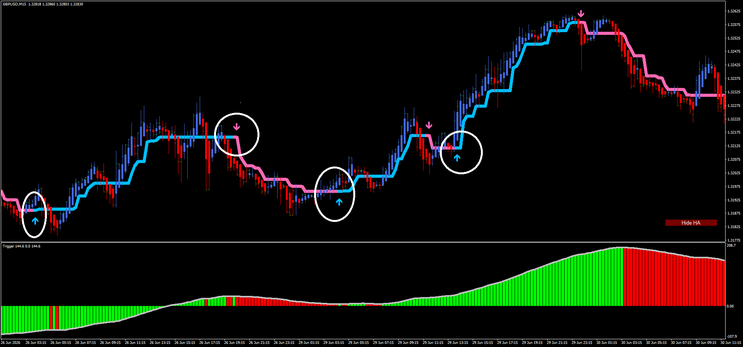
GBPUSD M15 (Image 1): Clear uptrend from 26 Jun to 29 Jun — Firebrand Blue, HA Blue, Triker Green → multiple long entries. Reversal on 30 Jun — Firebrand turns Pink, HA turns Red, Triker turns Red → short entries.
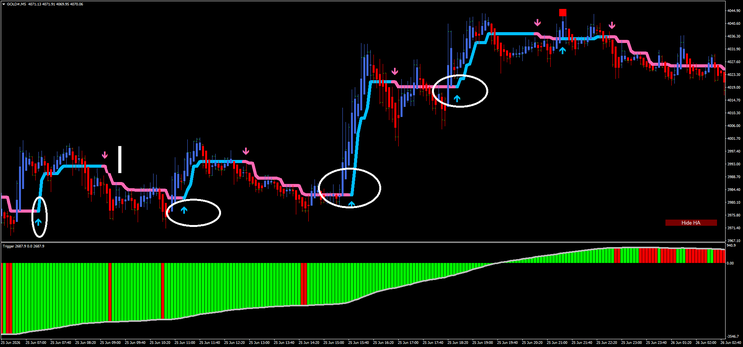
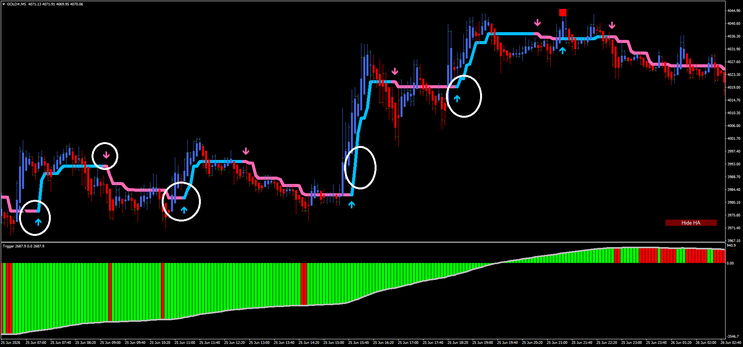
GOLD# M5 (Image 2): Strong bullish impulse around 25 Jun 15:00 — all indicators aligned Green/Blue → high-probability long.
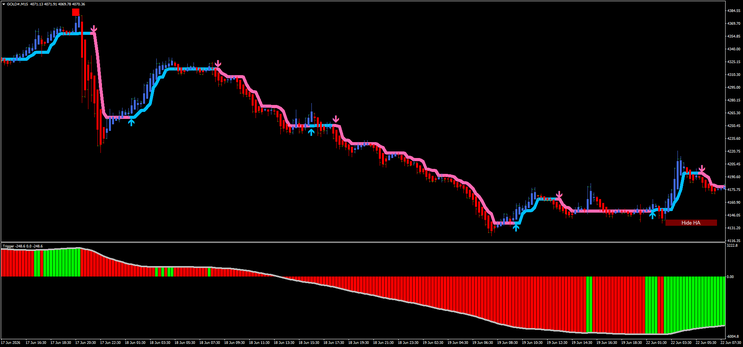
GOLD# M15 (Image 3): Extended downtrend 17–19 Jun — Firebrand Pink, HA Red, Triker Red → consistent short bias. Recovery 22 Jun — alignment shifts bullish.
GBPUSD M30 (Image 4): Macro trend clearly visible — Green Triker histogram from 25 Jun confirms the bullish phase seen on M15.


308# High Frequency Scalping System
HFT (High Frequency Trading)
Filtered by Damiani Volameterand Instant Trendline Filter
Submit By Maximo Trader 25/03/2012
Time Frame 5min.
Currency pairs: majors.
Metatrader Indicators:
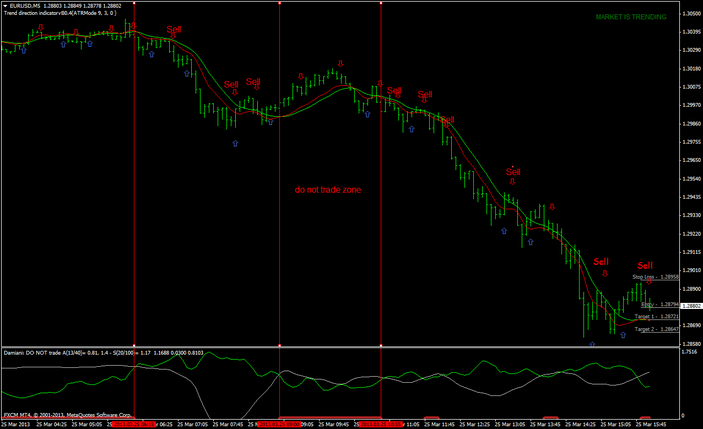
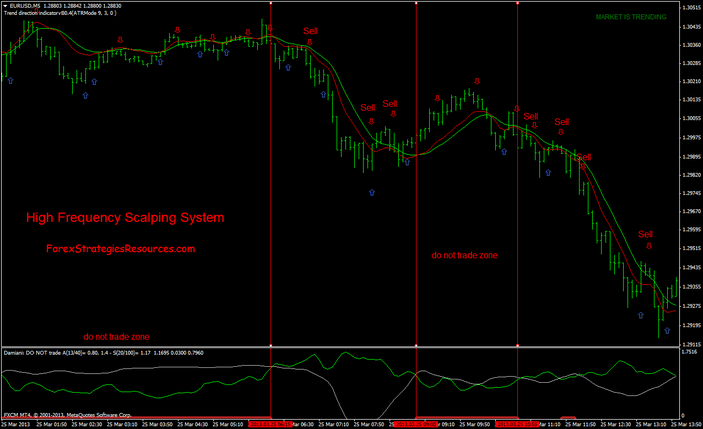
HFT (High Frequency Trading) (ATR 14, ATR level 0,0005, ATRBC 5,);
Damiani Volameter 3.2 (default);
Instant Trendline Filter (Alpha 0,7).
HFT Metatrader Indicator is a scalping system .
Open position right on signal (arrow+alarm), on the display we see also target price 1, target price 2 and stop loss.
Open position right on signal (arrow+alarm), on the display we see also target price 1, target price 2 and stop loss. in top right corner we se also if matket is flat or trending but in this scalping system is not important because we use other two indicators for filter: Damiani Volameter and InstanTrendline Filter.
Long Entry
HFT Arrow Buy;
Damiani Trading Zone green line > white line;
Instant Trendline Filter, red line> green line.
Short Entry
HFT Arrow Sell;
Damiani Trading Zone green line > white line;
Instant Trendline Filter, red line< green line.
Exit position see indication on display of HFT indicator (targets and stop loss).
This Scalping System is good also with Time Frame 15min.
HFT (High Frequency Trading)
Damiani_volatmeter v3.2
Instant Trendline Filter
high frequency scalping system
-
#17
Hi is it possible to get the source code to create an autonomous system for this?
-
#16
Understood with the filter. Super +5. It is necessary to put the lower limit of -0.1. If the green line is on top, then it is recommended to trade, if it is gray below, then it is not recommended to trade. Filters very well - when the flat is visible.
Thank.
I recommend to everyone. Roman -
#15
Looks interesting, how exactly do you identify the no trade zone? Is it when the message in the top right says ranging or something like that? Or is it something else?
-
#14
Hello everyone
Is it necessary to install all attachments filters: Damiani Volameter and InstanTrendline Filter?
The Expert Advisor, how to set it up for better profits? -
#13
good one. thanks
-
#12
Is it possible to make it work on M15 M30 H1 H4. That would be great. I like how it gives you entry, S/L and TP1,2 and 3.
-
#11
@Alexander - how did the EA do in testing?
-
#10
I have done this EA
-
#9
How much would people here be prepared to pay for an EA of this?
-
#8
Would be great to know a bit about the buffers to build an EA...
-
#7
Great indicator this HFT. It´s possible to get mql code of?
Best regards. -
#6
Does the arrow repaint or not ?Moreover it appears at the opening of next bar or delay ?
-
#5
Thank you for the great indicators. Great for avoiding the whipsaws when scalping or adding to positions.
-
#4
@ Marc: The "do not trade zone" is where the white line is above the green line.
Cheers! -
#3
How do i identify the "do not trade" zone
-
#2
nice strategy, thanks
-
#1
Automating this strategy would be good!
Scalping Systems
22# Trendline Scalper - Forex Strategies - Forex Resources -
78# Advanced Trendline Scalping Strategy - Forex Strategies ...
Forex Books about trend line e pattern. - Forex Strategies - Forex ...
116# Trendline Forex Entry Signal, Two High Probability Setups ...
119# Sperandeo Victor, Trendline Method - Forex Strategies -
104# Tom De Mark Trend line Strategy - Forex Strategies - Forex
54# 5min Forex Trade - Forex Strategies - Forex Resources - Forex
47# 5min Method - Forex Strategies - Forex Resources - Forex ...
138# 5 min Momo Trader - Forex Strategies - Forex Resources ...
2# 5 Min Blue Trend Rider - Forex Strategies - Forex Resources ...
95# 5 min Method - Forex Strategies - Forex Resources - Forex ...
