


312# Supertrend AI: How It Works and How to Use
Janus Trader 2026
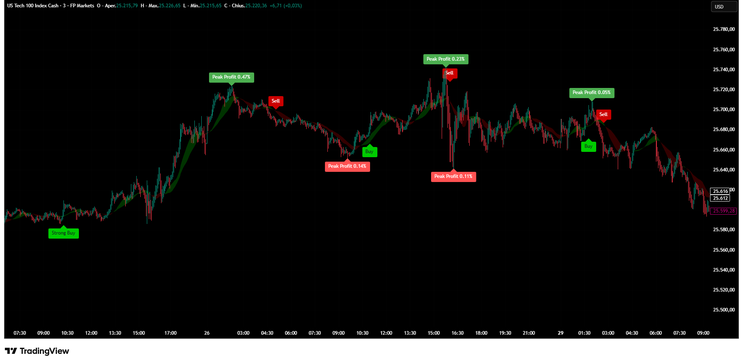
Supertrend AI is a trend-following indicator designed to identify high-probability buy and sell opportunities
by combining classic technical analysis tools with adaptive logic and visual clarity.
Despite the “AI” name, the strength of this indicator lies in its intelligent integration of Supertrend, Moving Averages, RSI-based visuals, and ATR
risk management, all optimized to work together in real time without repainting historical data.
Setup
Setting up Supertrend AI on TradingView is straightforward:
-
Open TradingView and add the indicator “Supertrend AI | Ultimate Algo | Remastered+” to your chart.
-
Apply it directly on the price chart (overlay enabled).
-
Adjust the main inputs:
-
Sensitivity: Controls how reactive the Supertrend is.
-
Lower values = faster signals, more trades
Higher values = smoother trend, fewer signals
Trend Ribbon (Cloud): Optional visual filter that highlights bullish and bearish phases.
Risk Management Settings (optional):
-
ATR-based Stop Loss,
Take Profit levels (1:1, 2:1, 3:1 Risk–Reward),
Lines or labels for Entry, SL, and TP.
-
-
The default settings are suitable for most traders and markets, especially for intraday and swing trading.
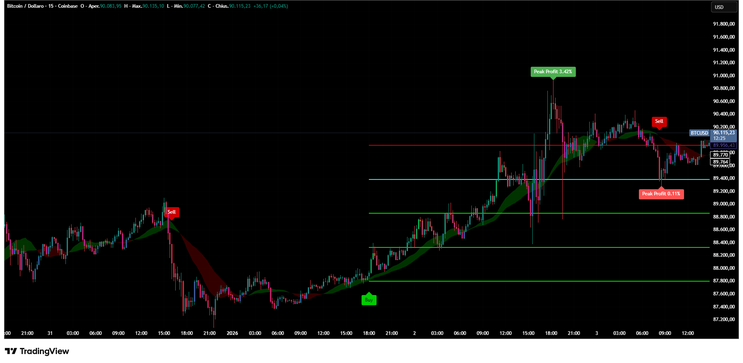
Currency Pairs and Markets
Supertrend AI is market-agnostic, meaning it works effectively on:
-
Forex pairs (EUR/USD, GBP/USD, USD/JPY, etc.).
Cryptocurrencies (BTCUSD, ETHUSD, altcoins).
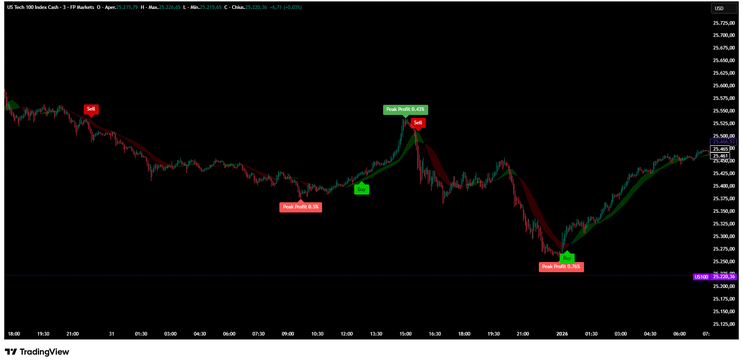
Indices (NASDAQ 100, S&P 500, DAX).
Stocks and commodities.
It performs best on liquid instruments with clear trends.
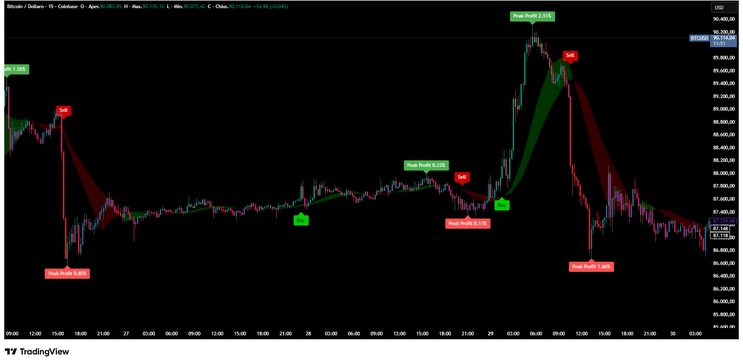
The indicator adapts well to multiple timeframes:
-
Lower timeframes (3m–15m): scalping and intraday trading.
Mid timeframes (30m–1h): day trading.
Higher timeframes (4h–Daily): swing trading.
Trading Rules
1. Trend Identification
-
The Supertrend line defines the main trend direction.
The Trend Ribbon (cloud) reinforces trend bias:
-
Green cloud → bullish environment,
Red cloud → bearish environment.
-
Only trade in the direction of the prevailing trend for higher probability setups.
2. Buy Signals
A Buy or Strong Buy signal appears when:
-
Price crosses above the Supertrend line.
Price is aligned with the slow SMA (trend confirmation).
Moving averages confirm bullish momentum.
Strong Buy signals indicate stronger momentum based on fast MA positioning.
3. Sell Signals
A Sell or Strong Sell signal appears when:
-
Price crosses below the Supertrend line.
Price is below the slow SMA.
Bearish momentum is confirmed.
As with buys, “Strong Sell” reflects stronger trend conviction.
4. Risk Management
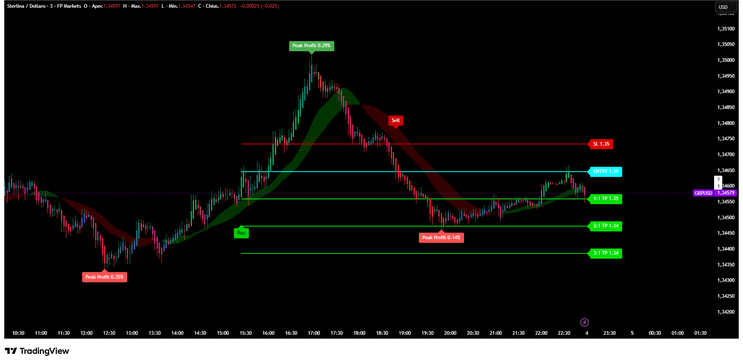
Supertrend AI includes a built-in ATR-based risk system:
-
Dynamic Stop Loss adapts to volatility.
Take Profit targets are calculated automatically using Risk–Reward ratios.
Levels update in real time on the current candle, while historical levels remain fixed.
This makes the indicator suitable for rule-based trading plans and disciplined execution.
5. Important Behavior Note
-
Signals may appear or disappear during a live candle (normal behavior).
A signal is confirmed only at candle close.
Historical signals never repaint.
Conclusion
Supertrend AI is a powerful and practical trend-following indicator built for traders who value clarity, structure, and consistency. By combining classic indicators—Supertrend, SMAs, RSI visuals, and ATR risk management—it provides a complete trading framework rather than just entry signals.
Used correctly, Supertrend AI helps traders:
-
Stay aligned with the dominant trend,
Avoid emotional trading,
Apply consistent risk management,
Trade confidently across multiple markets.
As with any indicator, the best results come from discipline, confirmation, and proper risk control. Supertrend AI is not a shortcut—but it is a professional-grade tool that can significantly improve trading execution when used as part of a well-defined strategy.

312# Instant Trendline forex Strategy
Submit by Joy22 01/03/2012
Time Frame 4H
Currency pairs:any.
Indicators:
Instant trendline filter (default setting)
CC an(default setting: draw two lines at 0.002 and at -0.0020.
Long Entry
Instant Trendline crosses up and and the line Cyan of the CC Breaks orizzontal line 0.0020.
Short Entry
Instant Trendline crosses down and and the line green of the CC breaks orizzontal line 0.0020.
Exit
1)When Instant Trendline change direction;
2)Trade objective: 1:2 risk-to-reward ratio or better.; Move stop loss to break even at risk-to-reward ratio 1:0.5
3) Aggressive Stop loss 50; Profit Target 45
In the pictures below Instant Trenline filter: Trading System in action.
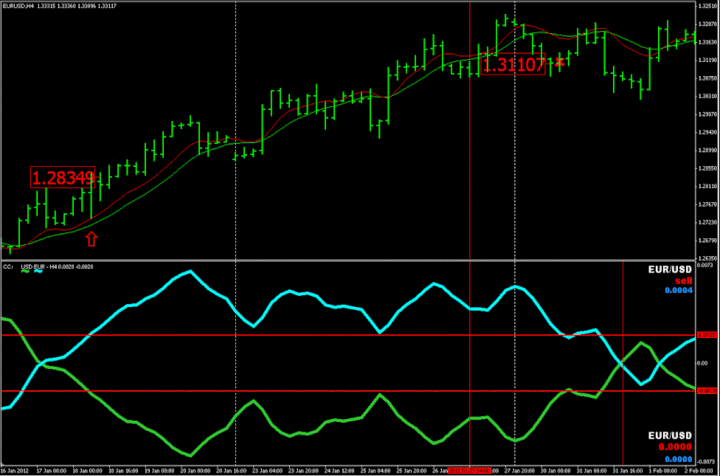
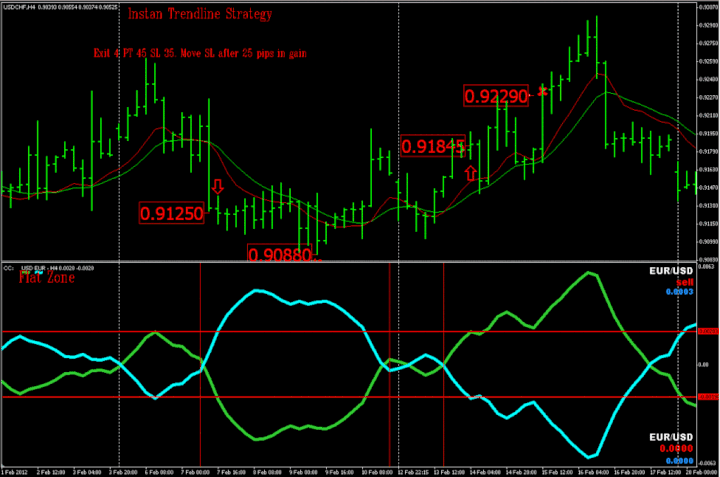
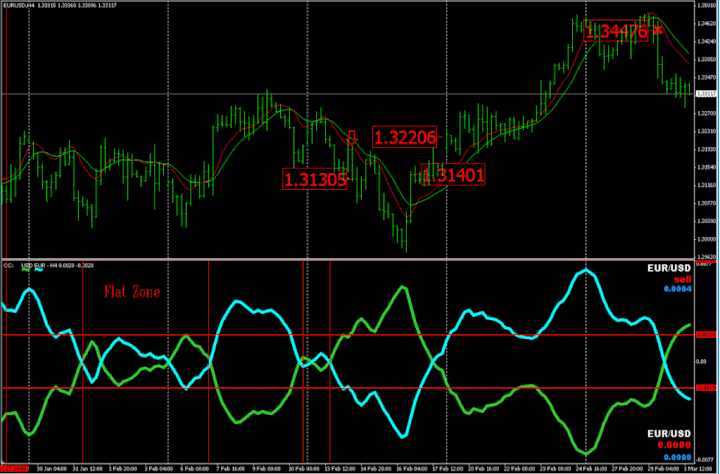
Instant Trenline filter:Trading System

Trendline Forex Strategies
22# Trendline Scalper - Forex Strategies - Forex Resources -
78# Advanced Trendline Scalping Strategy - Forex Strategies ...
Trendline Metatrader indicator - Forex Strategies - Forex Resources ...
6# Trend line Breakout and Fibonacci - Forex Strategies - Forex ...
116# Trendline Forex Entry Signal, Two High Probability Setups ...
104# Tom De Mark Trend line Strategy - Forex Strategies - Forex
38# Trendline Breakout - Forex Strategies - Forex Resources -
61# Momentum and Demark Trend line - Forex Strategies - Forex ...
119# Sperandeo Victor, Trendline Method - Forex Strategies -
312# Instant Trendline forex Strategy - Forex Strategies - Forex ...
8# Trendline Candelstick pattern with Fibo - Forex Strategies -
117# Trendline System - Forex Strategies - Forex Resources -
189# Instant Trendline Filter Scalping - Forex Strategies - Forex ...
Forex Books about trend line e pattern. - Forex Strategies - Forex ...
16# Mouteki System - Forex Strategies - Forex Resources - Forex ...
DeMark Metatrader Indicator - Forex Strategies - Forex Resources ...
2# Tom Demark FX system - Forex Strategies - Forex Resources ...
14# DeMarK System - Forex Strategies - Forex Resources - Forex
